
Trading ERP · UAE, KSA & India
Built around the way your trading business works.
From international purchase to customer delivery, Hipersign ERP connects suppliers, shipments, warehouses, sales, credit and finance — so you know what you have, where it is and what every product really earns.
Download brochure ↓ · Try the live prototype ↗
- Wholesale & distribution
- Import / export
- Multi-warehouse
- Free data migration
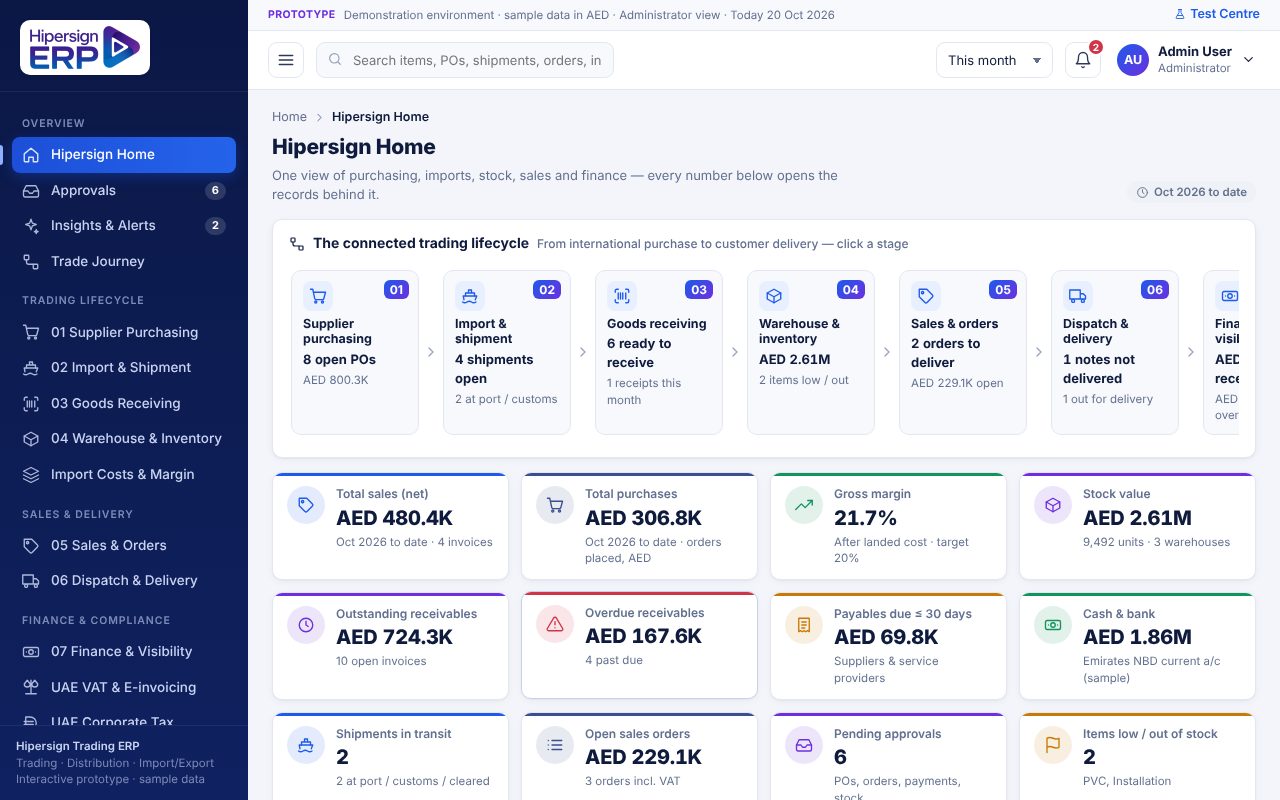
| Measure | AED |
|---|---|
| Total sales (net) | 480.4K |
| Total purchases | 306.8K |
| Gross margin (after landed cost) | 21.7% |
| Stock value · 3 warehouses | 2.61M |
| Outstanding receivables | 724.3K |
Interactive prototype
Experience Hipersign Trading ERP yourself.
Open a working prototype of the software and click through it with sample data. See the screens your team would use every day, before you speak to anyone.
- The whole trading journey: purchase, shipment, landed cost, stock, sales, delivery and invoice.
- Do things, don’t just look: raise a purchase order, receive goods, create a sales order and watch the numbers change.
- Safe sample data: nothing you do is saved to our systems, and a reset button restores the original data.
Opens straight away, with no sign-up. The prototype is in English.
Where to start
- Hipersign Home — the whole lifecycle at a glance
- Trade Journey — follow one order from purchase to payment
- Import Costs & Margin — see landed cost and your real margin
- Approvals — see how a purchase order is approved
Do these challenges sound familiar?
Trading is complex. Your systems shouldn’t make it harder.
Stock discrepancies
Physical stock and system records don’t match.
With Hipersign ERP
Every receipt, transfer and dispatch recorded against the right warehouse and bin.
Unclear product margins
Freight, customs and handling are never added to product cost.
With Hipersign ERP
Landed cost spread across each shipment, so margins reflect the true cost.
Fragmented operations
Purchasing, warehouse, sales and finance on separate systems.
With Hipersign ERP
One connected flow from purchase order to customer invoice.
Delayed financial visibility
Reports arrive late after manual consolidation.
With Hipersign ERP
Sales, stock, receivables and payables reports, live.
What’s inside
Built-in controls that protect your margin and your cash.
Controls built in
The right person approves the right thing.
Approval rules follow your business, not the other way round. Every document shows which rule sent it for approval and who must act.
- Purchase orders go to the Purchase Manager, and to Finance above a value you set
- Sales orders are held for the Sales Manager when the discount is too high or the price is below landed cost
- Orders above a customer’s credit limit wait for Finance
- Stock counts need the Warehouse Manager; large supplier payments need Finance
| Document | Rule | Approver |
|---|---|---|
| Purchase order | Every order · above AED 100,000 | Purchase Mgr · Finance |
| Sales order | Discount above 10% | Sales Manager |
| Sales order | Credit limit exceeded | Finance Manager |
| Sales order | Rate below landed cost | Sales Manager |
| Stock count | Always | Warehouse Mgr |
| Supplier payment | Above AED 50,000 | Finance Manager |
| Required to clear | Status |
|---|---|
| Customs entry (BOE) number | Required |
| Commercial invoice | Attached |
| Packing list | Attached |
| Certificate of origin | Required |
| Bill of lading / AWB | Attached |
Import & customs
No goods received before they’re cleared.
Track every import from booking to customs clearance. The system will not let a shipment be marked cleared, or its goods received, until the paperwork is complete.
- Seven shipment stages: booked, shipped, in transit, arrived, under clearance, cleared, received
- Clearing needs the customs entry number and all four documents
- Receiving is blocked until the shipment is cleared
- Receive against the purchase order: damaged goods go to a rejected warehouse, over-receipt is blocked
Landed cost & margin
Know what every shipment really cost.
The supplier’s price is only part of the cost. Freight, duty, clearing, insurance and handling are added to each item, so your margin is measured on what you really paid.
- Five cost types spread across the items in a shipment
- Foreign-currency purchases with exchange rates (USD, EUR, CNY and AED)
- Margin by item and shipment, measured on landed cost
- A sale below landed cost shows a negative margin and needs approval
| Charge | AED |
|---|---|
| Freight & shipping | 4,000.00 |
| Insurance | 450.00 |
| Customs duty | 3,895.00 |
| Clearing charges | 750.00 |
| Handling | 500.00 |
| Total added to item cost | 9,595.00 |
| Check | Result | AED |
|---|---|---|
| Contractor price, 40 × LED panel | −5% applied | 41,800 |
| Discount within limit | OK | |
| Credit limit | OK | |
| Rate above landed cost | OK | |
| VAT 5% | 2,090 | |
| Order total | Approved | 43,890 |
Sales & delivery
Sell with confidence. Deliver with proof.
Customer prices, discounts, credit limits and margin are checked before an order is confirmed. Then dispatch, delivery and proof of delivery follow from the same order.
- Customer-group pricing, for example Contractor, Wholesale or Government
- Quotation to sales order to delivery note to tax invoice
- Partial deliveries, drivers and trips, with proof of delivery required
- Receivables by customer, with overdue amounts in view
Warehouses & stock
Know what you have, and where it is.
Stock is tracked by item and warehouse, including goods still in transit and goods that were rejected.
- Transfers between warehouses, with a block on moving more than you have
- Stock counts that need Warehouse Manager approval before they change the books
- Reorder suggestions that start a purchase order
- Barcode receiving, and ageing to spot slow-moving stock
| Warehouse | Location |
|---|---|
| Main Warehouse | Jebel Ali Free Zone |
| Warehouse 2 | Al Quoz Industrial 3 |
| Warehouse 3 | Sharjah Industrial Area 13 |
| Goods in transit | Virtual |
| Rejected warehouse | Jebel Ali Free Zone |
UAE VAT & e-invoicing readiness
A VAT 201 return view by emirate, reverse charge on imports, Arabic and English invoices and delivery notes, and an e-invoicing readiness checklist. Our team will confirm the requirements that apply to you.
UAE corporate tax view
Corporate tax calculated from the same ledger as your VAT and financial reports, with adjustments, a provision and approval.
Rule-based alerts
Early warnings on shipments, stock, margins, credit and receivables. Each one shows its evidence and a recommended action.
Configured, not coded
Change approval thresholds, workflows, business rules and roles in settings, and the whole system follows.
Try it as each role
Switch between buyer, storekeeper, sales, finance and management to see what each person sees and is allowed to do.
Free migration from your current system
Assess, map, migrate, validate and go live. Your balances are reconciled before you switch over.
The connected trading lifecycle
From international purchase to customer delivery.
One chain of linked documents. Every number opens the records behind it.
- Supplier purchasing — approved orders, in your supplier’s currency
- Import & shipment — booking, documents and customs clearance
- Goods receiving — checked against the order, rejects set aside
- Warehouse & inventory — stock by warehouse, transfers and counts
- Sales & orders — pricing, discounts, credit and margin checked
- Dispatch & delivery — drivers, trips and proof of delivery
- Finance & visibility — receivables, payables, cash and profit
Resources
Free PDFs to share with your team
Interactive prototype
Click through purchasing, shipments, landed cost, stock and sales with sample data.
Open the prototypeERP brochure
What Hipersign ERP covers for this industry: modules, benefits and how it fits your business.
Download PDFFAQ
Questions traders ask us
Is data migration really free?
Yes. Migration of the agreed data scope from your existing system is included. We assess, map, migrate and validate your data before go-live.
Can it handle several warehouses and branches?
Yes. Run multiple warehouses, branches and even companies, with transfers and consolidated reporting.
How do landed costs work?
Freight, customs, insurance and handling charges are added to a shipment and spread across its items by value or quantity, so stock is valued at its true cost.
Can the workflows match our approval process?
Yes. Approval steps, document formats, reports and business rules are configured to your agreed requirements.
Related industry editions
Your next step starts here
Let’s build a better way to trade.
Book a personalised demonstration and discuss your workflows, reporting needs and business requirements.
+971 54 427 6655
+971 50 976 2927
+966 56 413 3619
+91 94957 71084
+44 20 3996 3885
sales@hipersignerp.com